
Video Player - AnyPlay
Efficient ToolsVideo Players & Editors
4.3548.00 Reviews
- Version
- 1.6.6
- Installs
- 10.00M
- Age Rating
- Teen
Screenshots

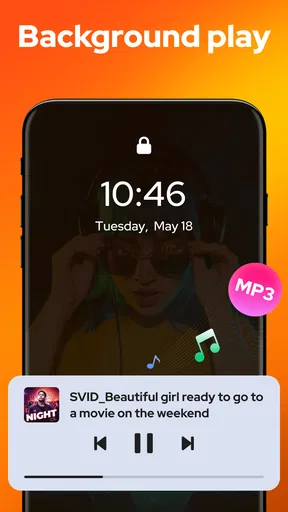
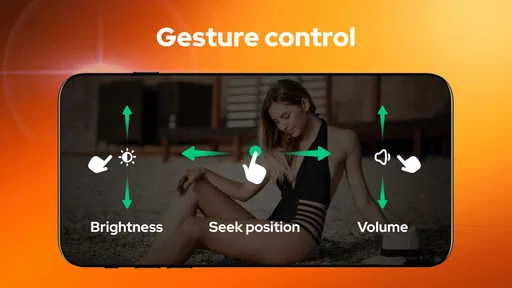
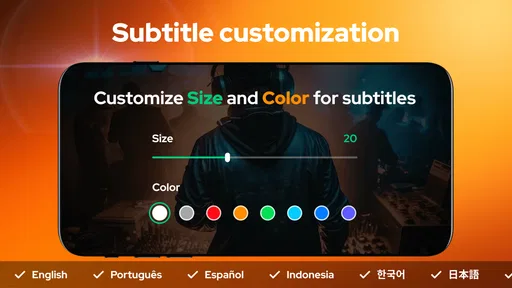
Our Review of Video Player - AnyPlay
 Analysis by Appyee
I spent time using Video Player - AnyPlay as an everyday media tool, and my first impression is that it aims to replace several separate utilities at once. It is a video player, a file manager, and a subtitle-friendly media app in one package. That combination makes sense for anyone who keeps downloaded films, phone recordings, music videos, or shared clips in different folders and wants one place to open them.
The app is developed by Efficient Tools and sits in the Video Players & Editors category. It is free to install, with optional in-app purchases ranging from $2.99 to $13.99 per item. Its store summary focuses on broad format support, 4K and HD playback, file management, and subtitles, but the more useful question is how well those pieces work together in normal use. In my experience, AnyPlay is most appealing when convenience matters more than having the deepest professional controls.
How AnyPlay feels in current everyday use
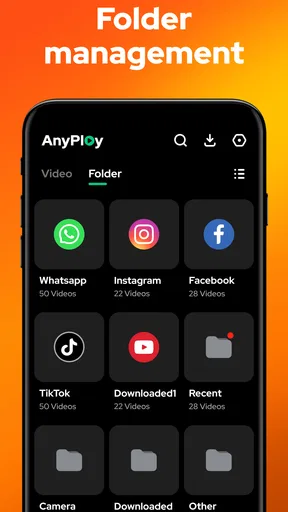
The strongest part of the app is its practical scope. Instead of opening a file manager, browsing to a folder, selecting a video, and then handing the file to a separate player, I can stay inside one app. That is particularly handy when I am checking several clips from a download folder or moving between locally stored videos and recordings made on the phone.
The interface is easier to understand when I treat it as a media library rather than a streaming service. AnyPlay is not trying to be a social video platform, a subscription catalog, or an editing suite. Its role is closer to a central shelf for media already available on the device. That distinction matters because the app is useful even when there is no internet connection, provided the files are already stored locally.
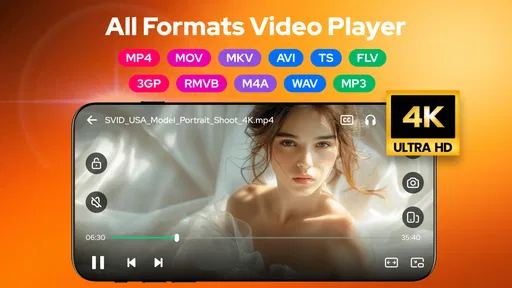
Playback of high-resolution material is one of the app’s headline strengths. The support for 4K and HD gives it a clear purpose for people who do not want to reduce the quality of their recordings before watching them. Still, resolution support alone does not guarantee that every unusual codec or container will behave perfectly on every phone. Hardware, file encoding, audio tracks, and subtitle formats can all affect the result.
I also like the way the file-manager side changes the workflow. When a video is buried in a folder with camera exports, messaging attachments, and old downloads, a player that can browse files directly saves time. The trade-off is that a file-oriented design can feel less polished than a dedicated gallery app. Users who want automatic albums, cloud synchronization, or an elaborate viewing history may find AnyPlay more utilitarian than elegant.
Who benefits most from the combined design
This app makes the most sense for people who regularly handle local media. A student carrying lecture recordings, a traveler watching downloaded videos, or a family member organizing phone clips can all benefit from having playback and file browsing together. It is also a reasonable option for someone whose default video app struggles with subtitles or does not expose folders clearly.
One realistic example is a weekend trip. I might copy several films and language-learning videos to a phone before leaving, keep them in separate folders, and use AnyPlay to open them without searching through a general photo gallery. If one title needs subtitles, I can work from the same media environment instead of switching between apps. That small reduction in friction is more valuable than a long list of rarely used controls.
On the other hand, I would not choose it as my first recommendation for someone who mainly watches online content, wants a polished television-style library, or needs serious video editing. The app’s identity is local playback and file access. People who need timeline editing, color correction, advanced casting controls, or a tightly integrated cloud collection should look toward tools designed specifically for those jobs.
Subtitles and high-resolution playback in practice
Subtitle support is important because a player can technically open a video while still making subtitle use awkward. AnyPlay is aimed at users who expect subtitles to be part of normal playback, whether they are watching foreign-language content, following dialogue in a noisy room, or using captions for accessibility. The practical tip is to keep the video and subtitle file organized together when possible. A clean folder structure makes manual selection and troubleshooting much easier than scattering related files across several locations.
For 4K footage, I would test a representative file before moving an entire collection into the app. A short sample can reveal whether the phone handles the resolution smoothly and whether the audio and subtitle combination behaves as expected. This is not a criticism unique to AnyPlay; demanding video files expose differences between phones much more quickly than ordinary HD clips. The app’s support is useful, but the device remains part of the playback equation.
Another practical consideration is storage. A file manager can make local media easier to find, but it does not remove the need to keep enough free space for large recordings. If the phone is nearly full, the better workflow is to review the biggest files first, delete duplicates, and keep only the versions you actually intend to watch. AnyPlay is helpful for locating media, but it cannot make high-quality files occupy less room unless you use a separate conversion tool.
What the current version tells me about its direction
The current version is 1.6.4, and that gives the app a more established feel than a first experimental release. It was released on September 15, 2023, so the product has had time to develop beyond the earliest stage. I would still judge the app by what is available now rather than assuming that every future update will add a particular feature.
That distinction is important when choosing a media player. A version number can suggest ongoing maintenance, but it does not automatically mean that the app will match a specialist player in every area. What I can reasonably say is that AnyPlay’s present direction is clear: it is refining a general-purpose local media experience around playback, folders, quality, and subtitles rather than presenting itself as a professional editing workstation.
For existing users, the current release should be viewed as a useful checkpoint. If the app already fits your routine, the combination of file access and playback is its main reason to stay. If you installed it hoping for a completely different kind of product, such as a full editor or streaming hub, a newer version number does not change that basic identity.
How it compares with familiar alternatives
Compared with a phone’s built-in gallery, AnyPlay is more focused on media playback and folder-based access. A gallery is usually better for browsing photos and short personal clips visually, while AnyPlay is more natural when I have a mixed collection of downloaded videos, recordings, and subtitle files. The choice depends on whether I want a visual memory timeline or a practical media cabinet.
Compared with a dedicated advanced video player, AnyPlay’s advantage is simplicity and the built-in file-management role. Specialist players may offer more detailed playback controls, broader customization, or a longer history of handling unusual files. AnyPlay is easier to justify when I want one straightforward tool rather than maximum control over every technical parameter.
Compared with a file manager that merely launches videos into another application, AnyPlay reduces the number of handoffs. That is a meaningful advantage when I am checking many files in sequence. The compromise is that a general-purpose app may not be as refined as the best separate tool in each individual category. I see AnyPlay as a practical middle ground, not an automatic replacement for every specialist.
Small workflows that make the app more useful
The first workflow I recommend is folder-first organization. Before importing or downloading a large group of videos, I would create simple folders based on purpose, such as travel, study, family clips, or temporary files. AnyPlay becomes more useful when its file-browsing strength is supported by clear organization. Without that preparation, even a capable player can turn into a long scrolling list.
The second is a quick compatibility check. I would open one ordinary HD file, one high-resolution file, and one subtitle-based video before relying on the app for an important trip or presentation. This takes little time and helps separate an app issue from a particular file or device limitation. It is also a better test than judging the player from a single familiar clip.
The third is to use the app as a review station for phone recordings. After filming an event, I can browse the relevant folder, check whether the audio is understandable, and remove unusable takes while the context is still fresh. This is more efficient than waiting until the files are mixed into a general gallery. It does not turn AnyPlay into an editor, but it gives the player a useful role in a simple capture-and-check workflow.
A fourth tip is to treat subtitle files as part of the media package. When moving videos between devices, I would copy the related subtitle files at the same time and preserve recognizable filenames. That avoids the common problem of having the video available but the captions separated or difficult to identify. The app’s subtitle support is most convenient when the surrounding file organization is sensible.
Where the experience still has limits
The broad feature set also creates the app’s main weakness: it may not satisfy users who want a highly specialized environment. A person who watches only through cloud services gains little from a local file manager. Someone who edits content professionally needs a timeline, trimming tools, transitions, and export controls rather than simply a capable viewer. AnyPlay should be selected for its actual role, not for features that belong to a different category.
There is also a learning curve whenever a player exposes files directly. New users may need to understand where downloads, camera recordings, and shared attachments are stored. That is not necessarily difficult, but it is less automatic than tapping a video in a polished gallery. The benefit is control; the cost is that I have to pay attention to folders and filenames.
In-app purchases are another point to consider. The app is free, which makes it easy to test without committing money immediately, but optional purchases are available. I would first establish whether the free experience covers my normal playback habits before buying anything. A paid upgrade is worthwhile only if it removes a limitation that genuinely affects my routine, not simply because the app offers an additional purchase.
The Teen content rating is also worth noting for families. That rating does not describe the content of every locally stored file; it describes the app’s store classification. Parents should still remember that a general file player can open media placed on the device, so the suitability of what is watched depends heavily on the files and the way the phone is managed.
What to watch as the app evolves
When I look at future updates, I would pay attention to improvements that make the combined player and file manager less cumbersome. Better organization, clearer handling of subtitle files, and dependable behavior with demanding video formats would have more practical value than a collection of decorative interface changes. Those are the areas that determine whether AnyPlay remains useful after the initial installation.
I would also watch how the app balances simplicity with control. Casual viewers need quick playback, while experienced users may want more ways to manage folders and deal with different media files. Adding options can help one group while making the interface heavier for another. The best direction would preserve the approachable file-browsing workflow while making advanced tasks easier to discover rather than forcing every user to see them.
For current users, the sensible approach is to keep judging updates against real problems: Does a file open more reliably? Are subtitles easier to use? Is browsing a large collection less frustrating? Those questions are more useful than chasing version numbers alone. The present release already communicates the basic product idea clearly, so future progress should be measured by how much time it saves in ordinary media tasks.
My recommendation after using it
Video Player - AnyPlay is a convincing choice for Android users who want a free, local-focused media app that combines playback with file management. Its support for HD and 4K material, subtitle use, and broad file-oriented purpose make it more flexible than a basic gallery viewer. The developer, Efficient Tools, has positioned it for everyday access to stored media rather than for editing or online discovery.
The app has also attracted a substantial audience, with an average rating of 4.4 from around 48 thousand ratings and over 10 million installs. Those figures suggest that the general concept connects with many users, although popularity should not replace a compatibility test with your own files. The Teen rating and the availability of optional purchases are additional details to keep in mind when deciding whether it fits your household and budget.
I would recommend trying it if your phone contains many downloaded videos, recordings, or subtitle files and you are tired of switching between a file manager and a player. I would skip it if your main needs are streaming, professional editing, cloud synchronization, or the most advanced playback customization available. For the right user, its biggest strength is not one spectacular feature but the way several ordinary tasks sit together in one place.
My bottom line is simple: AnyPlay works best as a practical local media hub. It makes everyday viewing and file checking easier, especially when subtitles and high-resolution videos are part of the routine. Just approach it as a capable general-purpose player, test important files before depending on it, and choose a specialist alternative when your needs go beyond browsing and watching.
Privacy and Permissions
See what permissions an app requests and how it handles your data.
- Photos/Media/Files
- read the contents of your USB storage, modify or delete the contents of your USB storage
- Storage
- read the contents of your USB storage, modify or delete the contents of your USB storage
- Wi-Fi connection information
- view Wi-Fi connections
- Other
- view network connections, full network access, draw over other apps, control vibration, prevent device from sleeping, read Google service configuration
Verdict
Strengths of Video Player - AnyPlay
- Supports many popular video formats without extra plugins.
- Simple interface makes playback easy for first-time users.
- Offers useful playback controls such as speed and subtitles.
- Can play locally stored videos without requiring an internet connection.
- Compact design helps keep navigation quick and uncluttered.
Limitations of Video Player - AnyPlay
- Some advanced features may be limited to the premium version.
- Ad-supported areas can interrupt the otherwise smooth viewing experience.
- Subtitle formatting may not work perfectly with every video file.
- Large or high-resolution videos can use considerable battery power.
- Privacy details may require careful review before importing personal media.
Other Releases by Efficient Tools
View All
Calculator: Simple Calculator
Tools4.2

Bible Audio - KJV Daily Verse
Books & Reference4.9
Similar Picks in This Category
View All
Google TV
Google LLC3.9

iTunes
Apple4.7

YouTube
Google LLC3.8

MX Player
Amazon Mobile LLC4.2

CapCut - Video Editor
Bytedance Pte. Ltd.3.5

PLAYit-All in One Video Player
PLAYIT TECHNOLOGY PTE. LTD.4.5
Frequently Asked Questions
What is Video Player - AnyPlay, and what types of media does it support?
Video Player - AnyPlay is designed to provide a convenient way to watch locally stored videos on a mobile device. Depending on the version and platform, it may support common formats such as MP4, MOV, MKV, AVI, and other widely used files. Before downloading, check the store listing for the exact format compatibility, subtitle support, and any limitations related to high-resolution or unusual video files.
Can Video Player - AnyPlay play videos without an internet connection?
Yes, the main purpose of a mobile video player is generally to play files already saved on your device without requiring an active internet connection. This makes AnyPlay useful when traveling or when mobile data is limited. However, features such as online content, advertisements, cloud access, updates, or optional streaming services may require internet access, so offline availability can vary by feature.
Does Video Player - AnyPlay support subtitles and different audio tracks?
Subtitle and audio-track support is an important consideration for users who watch movies, shows, or multilingual content. AnyPlay may recognize embedded subtitles and, in some cases, external subtitle files such as SRT. Support can depend on the video format and the app version. Users should also verify whether subtitle size, color, synchronization, and audio-track selection can be adjusted.
Is Video Player - AnyPlay free to download, and does it contain advertisements or in-app purchases?
Video Player - AnyPlay may be available as a free download, but free access does not always mean that every feature is included without restrictions. The application may display advertisements or offer optional purchases for removing ads, unlocking advanced playback tools, or accessing additional functionality. Pricing and availability can differ between Android and iOS, so review the current store information before installing.
What permissions does Video Player - AnyPlay require, and is it safe to use?
A video player normally needs permission to access photos, videos, or files so it can scan and play media stored on the device. These permissions are reasonable for its core function, but users should review the requested access during installation and deny anything unnecessary. For safety, download AnyPlay only from the official Google Play Store or Apple App Store and check its privacy policy.
